LLM Gateway API Documentation
Table of Contents
Introduction
Access and build applications seamlessly with your preferred model from a comprehensive pool of LLMs available through the LLM Gateway, supporting a diverse range of capabilities, including text generation, multimodal capabilities, image generation, speech-to-text transcription, and embedding generation. Our platform ensures your applications are safeguarded with robust guardrails while enhancing prompt responses through advanced caching mechanisms. Simply generate an LM-API key via the Kadal platform, and you're ready to deploy. To accelerate your development, we also offer a curated collection of demo implementation scripts tailored for all supported models.
Architecture

How to Find Your LM-Key 🔑
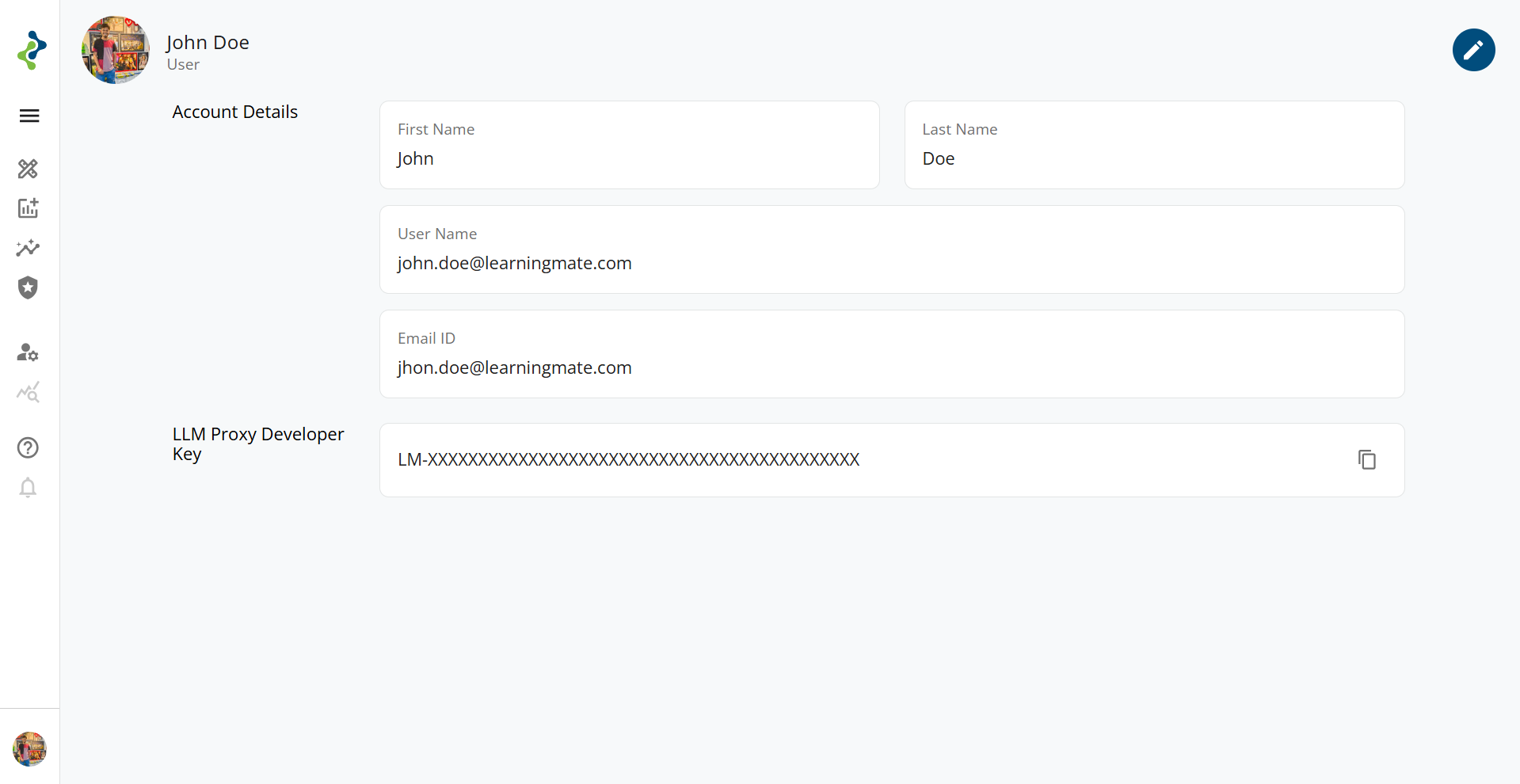
To access the kadal.ai APIs, you need an API key known as the LM-Key. This key uniquely identifies your account and is required to authenticate API requests. Follow the steps below to retrieve it from your profile.
Steps to Retrieve Your LM-Key
-
Login to kadal.ai Go to https://kadal.ai and log in using your registered email and password.
-
Navigate to Profile Once logged in, look for your avatar located on the bottom-left corner of the screen. Click it to open the profile menu.
-
Copy the LM-Key On the Profile page, you’ll see a field labeled LM-Key. Click the copy icon next to it to copy your API key.
⚠️ Important Notes
-
Keep your LM-Key secret and secure.
-
Do not share your LM-Key publicly or commit it to version control.
Providers
Azure OpenAI
| Models | Context Length | Price (M Tokens) | Active / Deprecated | Model Support |
|---|---|---|---|---|
| gpt-5.4 New | 400K | Input: $2.50, Output: $15 | Active | text, image |
| gpt-5.4-mini New | 400K | Input: $0.75, Output: $4.50 | Active | text, image |
| gpt-5.4-nano New | 400K | Input: $0.20, Output: $1.25 | Active | text, image |
| gpt-5.1 | 400K | Input: $1.25, Output: $10.000 | Active | text, image |
| gpt-5 | 400K | Input: $1.250, Output: $10.000 | Active | text, image |
| gpt-5-mini | 400K | Input: $0.250, Output: $2.000 | Active | text, image |
| gpt-5-nano | 400K | Input: $0.050, Output: $0.400 | Active | text, image |
| gpt-4.1 | 1,047K | Input: $2.00, Output: $8.00 | Active | text, image |
| gpt-4.1-mini | 1,047K | Input: $0.40, Output: $1.60 | Active | text, image |
| gpt-4.1-nano | 1,047K | Input: $0.10, Output: $0.40 | Active | text, image |
| o3 | 200K | Input: $2, Output: $8 | Active | text, image |
| o3-mini | 200K | Input: $1.10, Output: $4.40 | Active | text |
| gpt-4o | 128K | Input: $2.75, Output: $11 | Active | text, image |
| o1-mini | 128K | Input: $3.30, Output: $13.20 | Active | text, image |
| o1 | 200K | Input: $16.50, Output: $66 | Active | text, image |
| gpt-image-1 | -- | Input: $5, Output: $40 | Active | text, image |
| gpt-image-1-mini | -- | Input: $2, Output: $8 | Active | text, image |
Azure Deepseek
| Models | Context Length | Price (M Tokens) | Active / Deprecated | Model Support |
|---|---|---|---|---|
| deepseek-r1 New | 128K | Input:--, Output: -- | Active | text |
Vertex AI
| Models | Context Length | Price (M Tokens) | Active / Deprecated | Model Support |
|---|---|---|---|---|
| gemini-3.5-flash New | Max input tokens: 1,048,576 Max output tokens: 65,535 | Input: $1.50, Output: $9.00 | Active | text, image |
| gemini-3.1-flash-lite-preview New | Max input tokens: 1,048,576 Max output tokens: 65,535 | Input: $0.25, Output: $1.50 | Active | text, image |
| gemini-3.1-flash-image-preview New | Max input tokens: 131,072 Max output tokens: 32,768 | Input: $0.50, Output: $3, Image Output: $60 | Active | text, image |
| gemini-3.1-pro-preview New | Max input tokens: 1,048,576 Max output tokens: 65,535 | Input: $2, Output: $12 | Active | text, image |
| gemini-3-pro-image-preview New | Max input tokens: 1,048,576 Max output tokens: 65,535 | Input: $2, Output: $12, Image Output: $120 | Active | text, image |
| gemini-2.5-flash-lite | Max input tokens: 1,048,576 Max output tokens: 65,535 | Input: $0.1, Output: $0.4 | Active | text, image |
| gemini-2.5-flash-image | Max input tokens: 1,048,576 Max output tokens: 65,535 | Input: $2.5, Output: $15, Image Output: $30 | Active | text, image |
| gemini-2.5-flash | Max input tokens: 1,048,576 Max output tokens: 65,535 | Input: $0.30, Output: $2.50 | Active | text, image |
| gemini-2.5-pro | Max input tokens: 1,048,576 Max output tokens: 65,535 | Input: $2.5, Output: $15 | Active | text, image |
| gemini-2.0-flash | Max input tokens: 1,048,576 Max output tokens: 8,192 | Input: $0.15, Output: $0.60 char | Active | text, image |
| gemini-2.0-flash-lite | Max input tokens: 1,048,576 Max output tokens: 8,192 | Input: $0.075, Output: $0.30 | Active | text, image |
| imagen-4.0-generate-001 | --- | Output: $0.004 per Image | Active | text |
| imagen-4.0-fast-generate-001 | --- | Output: $0.002 per Image | Active | text |
| imagen-3.0-generate-001 | --- | Output: $0.004 per Image | Active | text |
| imagen-3.0-fast-generate-001 | --- | Output: $0.002 per Image | Active | text |
AWS Bedrock
Anthropic:
| Models | Context Length | Price (M Tokens) | Active / Deprecated | Model Support |
|---|---|---|---|---|
| global.anthropic.claude-opus-4-8 New | 1M | Input: $5.00, Output: $25.00 | Active | text, image |
| global.anthropic.claude-opus-4-7 New | 1M | Input: $5.00, Output: $25.00 | Active | text, image |
| global.anthropic.claude-sonnet-4-6 | 1M | Input: $3.00, Output: $15.00 | Active | text, image |
| global.anthropic.claude-sonnet-4-5-20250929-v1:0 | 200k | Input: $3.00, Output: $15.00 | Active | text, image |
| global.anthropic.claude-opus-4-6-v1 | 1M | Input: $5.00, Output: $25.00 | Active | text, image |
| global.anthropic.claude-opus-4-5-20251101-v1:0 | 200k | Input: $5.00, Output: $25.00 | Active | text, image |
| global.anthropic.claude-haiku-4-5-20251001-v1:0 | 200k | Input: $1.00, Output: $5.00 | Active | text, image |
| global.anthropic.claude-sonnet-4-20250514-v1:0 | 200k | Input: $3.00, Output: $15.00 | Active | text, image |
OpenAI
| Models | Context Length | Price (k Tokens) | Active / Deprecated | Model Support |
|---|---|---|---|---|
| openai.gpt-oss-120b-1:0 New | 131k | Input: $0.00015, Output: $0.0006 | Active | text |
| openai.gpt-oss-20b-1:0 New | 131k | Input: $0.00007, Output: $0.0003 | Active | text |
Llama:
| Models | Context Length | Price (k Tokens) | Active / Deprecated | Model Support |
|---|---|---|---|---|
| us.meta.llama4-maverick-17b-instruct-v1:0 New | 128k | Input: $0.00024, Output: $0.00097 | Active | text, image |
| us.meta.llama4-scout-17b-instruct-v1:0 New | 128k | Input: $0.00017, Output: $0.00066 | Active | text, image |
Nova:
| Models | Context Length | Price (k Tokens) | Active / Deprecated | Model Support |
|---|---|---|---|---|
| us.amazon.nova-micro-v1:0 | 128k | Input: $0.000035, Output: $0.00014 | Active | text |
| us.amazon.nova-lite-v1:0 | 300k | Input: $0.00006, Output: $0.00024 | Active | text, image, Docs, Video |
| us.amazon.nova-pro-v1:0 | 300k | Input: $0.0008, Output: $0.0032 | Active | text, image, Docs, Video |
Additional Configuration Options
Individual User/Group
Configuration Options
is_cache
- Default:
1(caching is enabled). - Set to
0: Disables caching for API responses, ensuring each request fetches fresh results.
use_guard
- Default:
1(guardrails are enabled for input or output by default). - Set to
0: Completely disables guardrails. - Set to
2: Explicitly enables both input and output guardrails, providing maximum safeguards.
app_name
- A string specifying the application context.
- Include this only when the application is
DSPY.
lm_key = 'YOUR_LM_KEY'
userdata = {
    "is_cache": 0,
    "use_guard": 2,
    "app_name": "DSPY",
}
User_LM_Key = f"{lm_key}/{userdata}"
For Kadal Tenent:
is_cache
- Default:
1(caching is enabled). - Set to
0: Disables caching for API responses, ensuring each request fetches fresh results.
use_guard
- Default:
1(guardrails are enabled for input or output by default). - Set to
0: Completely disables guardrails. - Set to
2: Explicitly enables both input and output guardrails, providing maximum safeguards.
app_name
- A string specifying the application context.
- Include this only when the application is
DSPY.
Bot_Id
- A string representing the unique identifier for the bot.
- Example:
"cf72e8cb-ef5b-4c7f-9792-685e7100a94f".
Query_Id
- A string or integer representing the unique identifier for the current query.
- Example:
"24".
word_count_sent
- The number of words sent in the request.
- Example:
50.
word_count_received
- The number of words received in the response.
- Example:
100.
toxicity
- Indicates the toxicity level of the response.
- Example:
"Toxic".
sentiment
- Indicates the sentiment of the response.
- Example:
"Positive".
app_name
- A string specifying the application context.
- Include this key only when the application is
DSPY.
userid
- A string or integer representing the unique identifier for the user.
- Example:
"100".
is_system
- A boolean value indicating if the request is system-generated.
- Default:
True.
lm_key = 'YOUR_LM_KEY'
userdata = {
    userdata = {
    "is_cache":0,
    "use_guard":0,
    "Bot_Id": "cf72e8b-ef5b-4c7f-9792-685e7100a94f",
    "Query_Id": "24",
    "word_count_sent": 50,
    "word_count_received": 100,
    "toxicity": "Toxic",
    "sentiment": "Positive",
    "app_name": "DSPY",  # use only when the app is DSPY
    "userid": "100",
    "is_system": False
        }
}
Tenent_LM_Key = f"{lm_key}/{userdata}"
Code Examples
Azure OpenAI code Examples
from openai import AzureOpenAI
azure_endpoint = 'https://api.kadal.ai/proxy/api/v2/azure'
lm_key = 'YOUR_LM_KEY'
api_version="2025-04-01-preview"

client = AzureOpenAI(azure_endpoint=azure_endpoint,
       api_version= api_version,
       api_key=lm_key)

response = client.chat.completions.create(
   model = "gpt-4o",
   temperature = 0.7,
   messages=[
       {"role": "user", "content": """Hello World"""}
])
print(response)
import requests  # Or use httpx
import json

# Azure OpenAI Configuration
azure_endpoint = 'https://api.kadal.ai/proxy/api/v2/azure'
lm_key = 'YOUR_LM_KEY'
headers = {
    'Content-Type': 'application/json',
    'api-key': lm_key
}

# Request Body
body = {
    'messages': [
        {'role': 'system', 'content': 'You are a helpful assistant.'},
        {'role': 'user', 'content': 'Hello! How can I improve my productivity?'}
    ],
    'model': 'gpt-4o',
    'temperature': 0.7
}

# Sending the Request
try:
    response = requests.post(
        f'{azure_endpoint}/openai/deployments/gpt-4o/chat/completions?api-version=2025-04-01-preview',
        headers=headers,
        json=body
    )

    # Check for successful response
    if response.status_code == 200:
        print("Response:")
        print(json.dumps(response.json(), indent=4))
    else:
        print(f"Error: {response.status_code} - {response.text}")

except Exception as e:
    print(f"An error occurred: {e}")
curl --location 'https://api.kadal.ai/proxy/api/v2/azure/openai/deployments/gpt-4o/chat/completions?api-version=2025-04-01-preview' \
--header 'Content-Type: application/json' \
--header 'api-key: <YOUR_LM_KEY>' \
--data '{"model":"gpt-4o",
    "temperature":0.7,
    "messages":[
    {"role": "user", "content": "Hello World"}
  ]}'
Multimodel Azure OpenAI Models
import base64  # Importing the base64 module to encode the image into Base64 format

# Function to encode an image into Base64
def encode_image(image_path):
    """
    Encodes the image at the given path into a Base64 string.
    Args:
        image_path (str): Path to the image file to be encoded.
    Returns:
        str: Base64-encoded string of the image.
    """
    with open(image_path, "rb") as image_file:  # Open the image file in binary mode
        # Read the file, encode its content to Base64, and decode it to a UTF-8 string
        return base64.b64encode(image_file.read()).decode('utf-8')

# Encode the image at the specified path
base64_image = encode_image("sample.png")

# Importing necessary modules
from openai import AzureOpenAI  # AzureOpenAI SDK for interacting with Azure OpenAI services

# Define Azure OpenAI endpoint and API key
azure_endpoint = 'https://api.kadal.ai/proxy/api/v2/azure'
lm_key = 'YOUR_LM_KEY'

# Specify the API version to use
api_version = "2025-04-01-preview"

# Initialize the AzureOpenAI client
client = AzureOpenAI(
    azure_endpoint=azure_endpoint,  # Azure OpenAI endpoint
    api_version=api_version,       # API version
    api_key=lm_key                 # Azure OpenAI API key for authentication
)

# Prepare the chat request
response = client.chat.completions.create(
    model="gpt-4o",  # Specify the model to use (e.g., GPT-4 optimized)
    temperature=0.7,  # Control the randomness of the response (higher = more random)
    messages=[
        {
            "role": "user",  # Role of the message sender
            "content": [
                {"type": "text", "text": "What's in this image?"},
                {
                    "type": "image_url",  # Specify the type as an image URL
                    "image_url": {  # Provide the image URL in Base64 format
                        "url": f"data:image/jpeg;base64,{base64_image}",  # Embed the Base64-encoded image
                    },
                },
            ],
        }
    ]
)

# Print the response from the Azure OpenAI service
print(response)
Deepseek-r1 Code Example
pip install azure-ai-inference
import os
from azure.ai.inference import ChatCompletionsClient
from azure.core.credentials import AzureKeyCredential
from azure.ai.inference.models import SystemMessage, UserMessage

# Initialize the ChatCompletionsClient with your endpoint and key
client = ChatCompletionsClient(
    endpoint="https://api.kadal.ai/proxy/api/v2/deepseek/deepseek-r1",
    credential=AzureKeyCredential("YOUR_LM_KEY"),  # Replace with your actual key
)

# Define the conversation history with system and user messages
messages = [
    SystemMessage(content="You are a helpful assistant. Always give me a JSON format."),
    UserMessage(content="Hi"),
]

# Generate a chat completion response
response = client.complete(
    messages=messages,
    temperature=0.5,     # Lower temperature for deterministic response
    top_p=1.0,           # Use full probability mass
    max_tokens=2048      # Limit the response length
)

# Print the response
print(response)
Embedding models
from openai import AzureOpenAI  # Importing the AzureOpenAI class

azure_endpoint = 'https://api.kadal.ai/proxy/api/v2/azure'
lm_key = 'YOUR_LM_KEY'
api_version = "2025-04-01-preview"

# Initialize the AzureOpenAI client
client = AzureOpenAI(
    azure_endpoint=azure_endpoint,
    api_version=api_version,
    api_key=lm_key
)


# Generate embeddings
response = client.embeddings.create(
    input="Your text string",
    model="text-embedding-ada-002"
)

print(response.data[0].embedding)
Image-1 Models
from openai import AzureOpenAI  # Importing the AzureOpenAI class

azure_endpoint = 'https://api.kadal.ai/proxy/api/v2/azure'
lm_key = 'YOUR_LM_KEY'
api_version = "2025-04-01-preview"


# Initializing the AzureOpenAI client with the endpoint, API version, and API key
client = AzureOpenAI(
    azure_endpoint=azure_endpoint,
    api_version=api_version,
    api_key=lm_key
)

response = client.images.generate(
    model="gpt-image-1",  # Specifying the model to use (gpt-image-1 / gpt-image-1-mini)
    prompt="generate a cat",  # The text prompt describing the image to generate
    size="1024x1024",  # The desired size of the image
    n=1  # Number of images to generate
)

# Extracting the URL of the generated image from the response
image_url = response.data[0].url
print(image_url)  # Printing the URL of the generated image
Whisper Models
from openai import AzureOpenAI  # Importing the AzureOpenAI class

azure_endpoint = 'https://api.kadal.ai/proxy/api/v2/azure'
lm_key = 'YOUR_LM_KEY'
api_version = "2025-04-01-preview"

# Initializing the AzureOpenAI client with the endpoint, API version, and API key
client = AzureOpenAI(
    azure_endpoint=azure_endpoint,
    api_version=api_version,
    api_key=LM_PROXY_KEY
)

# Opening the audio file that you want to transcribe
audio_file = open("sample.mp3", "rb")

# Making a request to transcribe the audio using the Whisper model
transcription = client.audio.transcriptions.create(
    model="whisper",  # Specifying the model to use (Whisper for audio transcription)
    temperature=0,  # Setting temperature to 0 for deterministic output (less randomness)
    response_format="verbose_json",  # The format in which you want the transcription response
    file=audio_file  # Passing the audio file to be transcribed
)

# Printing the transcribed text from the response
print(transcription.text)
Gemini Models
Generate Content
import requests  # Importing the requests library to make HTTP requests

# API key for authentication with the service
lm_key = 'YOUR_LM_KEY'
# Base URL for the Gateway server handling API requests
LLM_Gateway_SERVER_URL = 'https://api.kadal.ai/proxy/api/v2'

# Name of the model you want to use
model_name = 'gemini-2.0-flash'

# URL for the API endpoint to generate content using the specified model
url = f"{LLM_Gateway_SERVER_URL}/gemini/models/{model_name}:generateContent"

# Headers required for the API request
headers = {
    "Content-Type": "application/json",  # Setting the content type to JSON
    "api-key": f"{lm_key}",  # Including the API key for authentication
}

# The data payload for the API request
data = {
    "contents": [
        {
            "role": "user",  # Role of the content, indicating this is from the user
            "parts": [{"text": "Hello World"}]  # The text input from the user
        }
    ]
}

# Making a POST request to the API to generate content
response = requests.post(url, headers=headers, json=data)

# Printing the JSON response received from the API
print(response.json())
Image requests
import base64  # Importing the base64 module to encode the image into Base64 format
import requests  # Importing the requests library to make HTTP requests

# Function to encode an image into Base64
def encode_image(image_path):
    """
    Encodes the image at the given path into a Base64 string.
    Args:
        image_path (str): Path to the image file to be encoded.
    Returns:
        str: Base64-encoded string of the image.
    """
    with open(image_path, "rb") as image_file:  # Open the image file in binary mode
        # Read the file, encode its content to Base64, and decode it to a UTF-8 string
        return base64.b64encode(image_file.read()).decode('utf-8')

# Encode the image at the specified path
base64_image = encode_image("sample.png")
# API key for authentication with the service
lm_key = 'YOUR_LM_KEY'
# Base URL for the Gateway server handling API requests
LLM_Gateway_SERVER_URL = 'https://api.kadal.ai/proxy/api/v2'

# Name of the model you want to use
model_name = 'gemini-2.0-flash'

# URL for the API endpoint to generate content using the specified model
url = f"{LLM_Gateway_SERVER_URL}/gemini/models/{model_name}:generateContent"


headers = {
    "Content-Type": "application/json",
    "api-key": f"{lm_key}",
}

data={
  "contents": [
    {
      "role": "user",
      "parts": [
        {
          "inlineData": {
            "mimeType": "image/jpg", #PNG - image/png, JPEG - image/jpeg, WebP - image/webp
            "data": base64_image
          }
        },
        {
          "text": "What's in this image?"
        }
      ]
    }
  ]}

# Making a POST request to the API to generate content
response = requests.post(url, headers=headers, json=data)

# Printing the JSON response received from the API
print(response.json())
Imagen models
import requests  # For making HTTP requests to the API

# API key for authenticating with the LLM Gateway
lm_key = 'YOUR_LM_KEY'  # Replace with your actual API key

# Base URL for the LLM Gateway server
LLM_Gateway_SERVER_URL = 'https://api.kadal.ai/proxy/api/v2'

# Model name for image generation
model_name = 'imagen-3.0-fast-generate-001'

# Full URL for the model's prediction endpoint
endpoint = f"{LLM_Gateway_SERVER_URL}/gemini/models/{model_name}:predict"

# HTTP headers for the API request
headers = {
    "Content-Type": "application/json",
    "api-key": lm_key,
}

# Request payload containing the prompt and generation parameters
payload = {
    "instances": [
        {
            "prompt": "A fluffy orange tabby cat sitting on a windowsill with sunlight streaming through the window, ultra-realistic style."
        }
    ],
    "parameters": {
        "sampleCount": 2  # Number of images to generate
    }
}

# Send the request to the image generation endpoint
response = requests.post(endpoint, headers=headers, json=payload)

# Display the API response as JSON
print(response.json())
Bedrock Anthorpic Models
import requests  # Importing the requests library to make HTTP requests

# Base URL for the Gateway server handling API requests
LLM_Gateway_SERVER_URL = 'https://api.kadal.ai/proxy/api/v2'

# API key for authentication with the service
lm_key = 'YOUR_LM_KEY'

# Identifier for the specific model you want to use
modelId = "anthropic.claude-3-5-haiku-20241022-v1:0"

# Headers required for the API request
headers = {
    "api-key": f"{lm_key}",  # Including the API key for authentication
}

# The request body containing parameters for the API call
body = {
    'messages': [{'role': 'user', 'content': [{'text': 'Hello World'}]}],
    'inferenceConfig': {'maxTokens': 512, 'temperature': 0.5, 'topP': 0.9},
    'system': [{'text': 'This is a valid system text'}],
}

# Making a POST request to the API to generate a response from the model
response = requests.post(
    f"{LLM_Gateway_SERVER_URL}/bedrock/converse?modelId={modelId}",
    headers=headers,
    json=body
)

# Check for a successful response from the API
if response.status_code == 200:
    data = response.json()  # Parse the JSON response
    print(data)  # Print the response data
else:
    # Print an error message if the API call fails
    print(f"Error: API call failed with status code {response.status_code}, {response.text}")
Bedrock Llama Models
import requests
# Base URL for the Gateway server handling API requests
LLM_Gateway_SERVER_URL = 'https://api.kadal.ai/proxy/api/v2'

# API key for authentication with the service
lm_key = 'Your_LM_Key'

# Identifier for the specific model you want to use
modelId = "us.meta.llama4-maverick-17b-instruct-v1:0"

headers = {
    "api-key": f"{lm_key}",  # Including the API key for authentication
}

# The request body containing parameters for the API call
body = {
    'messages': [{'role': 'user', 'content': [{'text': 'Hello World'}]}],
    'inferenceConfig': {'maxTokens': 512, 'temperature': 0.5, 'topP': 0.9},
    'system': [{'text': 'This is a valid system text'}],
}

# Making a POST request to the API to generate a response from the model
response = requests.post(
    f"{LLM_Gateway_SERVER_URL}/bedrock/converse?modelId={modelId}",
    headers=headers,
    json=body
  )
# Check for successful response
if response.status_code == 200:
  data = response.json()
  print(data)
else:
  print(f"Error: API call failed with status code {response.status_code} , {response.text}")
Bedrock Nova Models
text generation:
import requests
import json

# Base URL for the Gateway server handling API requests
LLM_Gateway_SERVER_URL = 'https://api.kadal.ai/proxy/api/v2'

# API key for authentication with the service
lm_key = 'Your_LM_Key'


modelId = "us.amazon.nova-lite-v1:0"

body = json.dumps(
    {
        "messages": [
            {"role": "user", "content": [{"text": "Hello World"}]},
        ],
        "inferenceConfig": {"maxTokens": 512, "temperature": 0.5, "topP": 0.9},
        "system": [{"text": "This is a valid system text "}],
    }
)
headers = {"api-key": lm_key}

response = requests.post(
    f"{LLM_Gateway_SERVER_URL}/bedrock/v1/messages/nova?modelId={modelId}",
    headers=headers,
    json=json.loads(body),
)
# Check for successful response
if response.status_code == 200:
    data = response.json()
    print(data)
else:
    print(
        f"Error: API call failed with status code {response.status_code} , {response.text}"
    )
multimodel:
import requests
import base64
import json

# Base URL for the Gateway server handling API requests
LLM_Gateway_SERVER_URL = 'https://api.kadal.ai/proxy/api/v2'

# API key for authentication with the service
lm_key = 'Your_LM_Key'

modelId = "us.amazon.nova-lite-v1:0"

IMAGE_NAME = "sample.png"

with open(IMAGE_NAME, "rb") as f:
    image = f.read()
encoded_image = base64.b64encode(image).decode("utf-8")
user_message = "what in this image describe the image also."


body = json.dumps(
    {
        "messages": [
            {
                "role": "user",
                "content": [
                    {"text": user_message},
                    {"image": {"format": "png", "source": {"bytes": encoded_image}}},
                ],
            }
        ],
        "inferenceConfig": {"maxTokens": 512, "temperature": 0.5, "topP": 0.9},
        "system": [{"text": "This is a valid system text "}],
    }
)

headers = {"api-key": lm_key}

response = requests.post(
    f"{LLM_Gateway_SERVER_URL}/bedrock/v1/messages/nova?modelId={modelId}",
    headers=headers,
    json=json.loads(body),
)
# Check for successful response
if response.status_code == 200:
    data = response.json()
    print(data)
else:
    print(
        f"Error: API call failed with status code {response.status_code} , {response.text}"
    )
documents Input
import requests
import base64
import json

# Base URL for the Gateway server handling API requests
LLM_Gateway_SERVER_URL = 'https://api.kadal.ai/proxy/api/v2'

# API key for authentication with the service
lm_key = 'Your_LM_Key'
modelId = "us.amazon.nova-pro-v1:0"
Docs_NAME = "sample.pdf"

with open(Docs_NAME, "rb") as file:
    doc_bytes = file.read()
encoded_docs = base64.b64encode(doc_bytes).decode("utf-8")
user_message = "tell me the title of the document"


body = json.dumps(
    {
        "messages": [
            {
                "role": "user",
                "content": [
                    {
                        "document": {
                            "format": "pdf",
                            "name": "DocumentPDFmessages",
                            "source": {"bytes": encoded_docs},
                        }
                    },
                    {"text": user_message},
                ],
            },
        ],
        "inferenceConfig": {"maxTokens": 512, "temperature": 0.5, "topP": 0.9},
        "system": [{"text": "This is a valid system text "}],
    }
)

headers = {"api-key": lm_key}

response = requests.post(
    f"{LLM_Gateway_SERVER_URL}/bedrock/v1/messages/nova?modelId={modelId}",
    headers=headers,
    json=json.loads(body),
)
# Check for successful response
if response.status_code == 200:
    data = response.json()
    print(data)
else:
    print(
        f"Error: API call failed with status code {response.status_code} , {response.text}"
    )
Video Input
import requests
import time
import base64
import json

# Base URL for the Gateway server handling API requests
LLM_Gateway_SERVER_URL = 'https://api.kadal.ai/proxy/api/v2'

# API key for authentication with the service
lm_key = 'Your_LM_Key'

modelId = "us.amazon.nova-pro-v1:0"

Video_Name = "sample.mp4"

with open(Video_Name, "rb") as video:
    video_bytes = video.read()
encoded_video = base64.b64encode(video_bytes).decode("utf-8")
user_message = "what in this video."


body = json.dumps(
    {
        "messages": [
            {
                "role": "user",
                "content": [
                    {"text": user_message},
                    {"video": {"format": "mp4", "source": {"bytes": encoded_video}}},
                ],
            },
        ],
        "inferenceConfig": {"maxTokens": 512, "temperature": 0.5, "topP": 0.9},
        "system": [{"text": "This is a valid system text "}],
    }
)
headers = ({"api-key": lm_key},)
response = requests.post(
    f"{LLM_Gateway_SERVER_URL}/bedrock/v1/messages/nova?modelId={modelId}",
    headers=headers,
    json=json.loads(body),
)
# Check for successful response
if response.status_code == 200:
    data = response.json()
    print(data)
else:
    print(
        f"Error: API call failed with status code {response.status_code} , {response.text}"
    )
Responses:
| Status Code | Description | Content-Type |
|---|---|---|
| 200 | Successful | application/json |
| 400 | Bad Request | application/json |
| 401 | Unauthorized | application/json |
| 403 | Forbidden | application/json |
| 404 | Resource Not Found | application/json |
| 422 | Validation Error | application/json |
| 500 | Internal Server Error | application/json |
📞 Contact Us
If you have any questions, feedback, or need support, feel free to reach out to us through Email:
Thank you for working with us!